오류해결
개발개발 ·
java.lang.UnsupportedClassVersionError: Data/database has been compiled by a more recent version of the Java Runtime (class file version 60.0), this version of the Java Runtime only recognizes class file versions up to 52.0 (unable to load class Data.da..
증상
FTP로 웹 호스팅을 해보려고 파일질라에 파일을 전부 올린 뒤 도메인으로 접속했더니 이 오류가 떴다. 처음에는 `java.lang.UnsupportedClassVersionError: Data/database`라는 앞부분만 나와서 무슨 말인지 몰랐는데, 가끔 전체 메시지가 찍히길래 그걸로 검색해 원인을 찾았다.
오류 메시지 읽기
풀어 쓰면 이렇다. "너는 클래스 파일 버전 60.0을 쓰고 있는데, 지금 자바 런타임은 52.0까지만 알아본다. 그래서 `Data` 패키지의 `database` 클래스를 못 읽겠다." 결국 버전을 52까지 낮추라는 뜻이다.
여기서 60.0, 52.0 같은 숫자는 클래스 파일 포맷 버전이고, 자바 SE 버전과 일대일로 대응한다.
• 45 = Java 1.1
• 46 = Java 1.2
• 47 = Java 1.3
• 48 = Java 1.4
• 49 = Java 5
• 50 = Java 6
• 51 = Java 7
• 52 = Java 8
• 53 = Java 9
• 54 = Java 10
• 55 = Java 11
• 56 = Java 12
• 57 = Java 13
즉 60.0은 Java 16이고, 맞춰야 할 52는 Java 8(JavaSE-1.8)이다.
해결 — 세 곳을 모두 맞춰야 한다
한 곳만 바꾸면 오류가 그대로 남는다. 아래 셋을 전부 1.8로 맞춰야 한다.
1. JDK 버전과 환경 변수
JDK 1.8을 내려받고 환경 변수까지 설정한다. "jdk1.8 환경변수 설정"으로 검색하면 바로 나온다.
2. 프로젝트 Build Path의 JRE 시스템 라이브러리
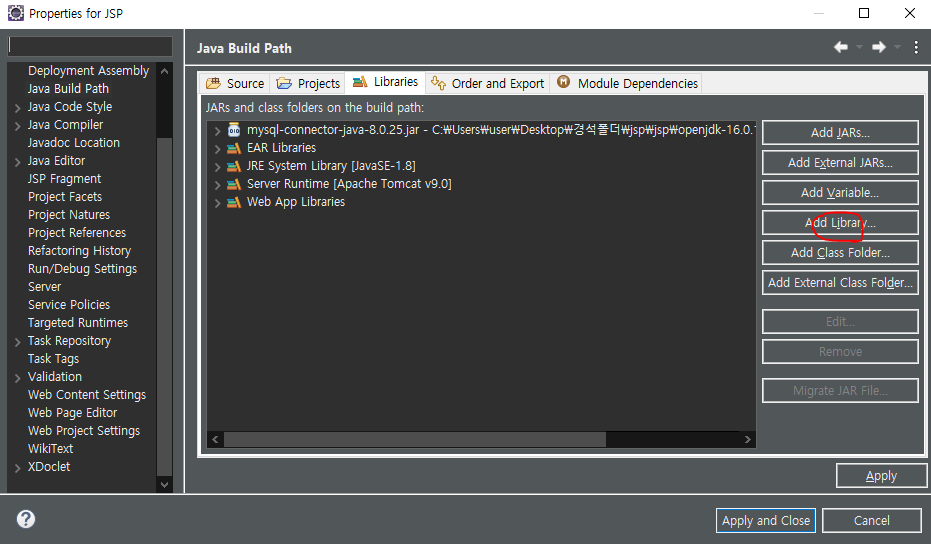
프로젝트 우클릭 → Build Path → Libraries 탭 → Add Library
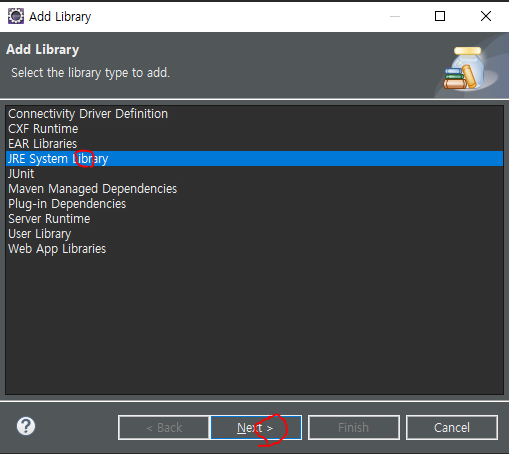
JRE System Library를 고르고 Next.
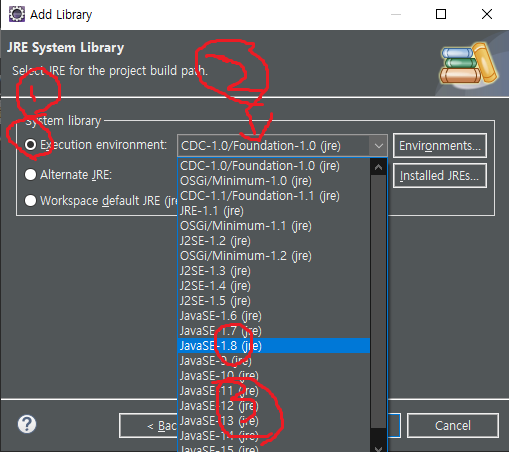
Execution environment를 선택하고 목록에서 JavaSE-1.8을 고른 뒤 Finish. 그다음 기존에 있던 JRE System Library를 삭제하고 Apply and Close를 누른다. 이걸로 JRE 시스템 라이브러리는 1.8이 됐다.
3. Project Facets의 Java 버전
2번까지 했는데도 오류가 남는 이유가 여기 있다. JRE 시스템 라이브러리를 바꿔도 Project Facets가 인식하는 버전은 따라오지 않는다.
프로젝트 우클릭 → Properties → Project Facets → Java 오른쪽의 version → 1.8로 변경.
세 단계를 모두 마치면 오류가 사라진다.
jsp 웹 호스팅간 NullPointerException
증상
이클립스에서 실행할 때는 멀쩡히 돌아가던 것이, 도메인으로 접속하면 `NullPointerException`이 떴다. 여기에 몇 시간을 썼다.
양쪽 다 안 되면 이클립스에서 `System.out.println`으로 null을 찾아 가면 되는데, 한쪽에서만 되니까 손댈 곳이 없어 답답했다.
원인
의심 가는 곳은 `Connection` 객체였다. `DriverManager.getConnection`이 null을 돌려주는 정황이 보였다.
알고 보니 JDBC URL의 데이터베이스 이름 자리, 그러니까 `jdbc:mysql://localhost:3306/` 뒤에 cafe24 아이디를 적어야 했다. 허무하게 끝난 오류였다.
해결
도메인 DB를 DBeaver 같은 툴로 연결해 뒀다면, `Connection` 객체를 만드는 클래스를 이렇게 바꾸면 된다.
Class.forName("com.mysql.jdbc.Driver");
String jdbcDriver = "jdbc:mysql://localhost:3306/cafe24 아이디";
String dbUser = "cafe24 아이디";
String dbPass = "cafe24 디비 비밀번호";
Connection conn;
conn = DriverManager.getConnection(jdbcDriver, dbUser, dbPass);
이클립스로 했을때와 FTP를 이용한 웹호스팅에서 이벤트결과가 다를때
증상
1. 이클립스에서 부트스트랩으로 토글 버튼을 만들었다 — 잘 됐다.
2. FTP로 호스팅했다.
3. 도메인으로 들어가 보니 이벤트가 먹통이었다.
원인을 찾아가며
이벤트가 안 먹는다는 건 서버가 자바스크립트나 제이쿼리를 인식하지 못한다는 뜻이다. 처음에는 제이쿼리를 CDN으로 불러오고 있어서 서버가 그 URL을 못 잡는 줄 알았다. 그래서 제이쿼리 파일을 직접 내려받아 폴더에 넣고 서버에 올렸다 — 역시 먹통이었다.
해결
원인은 의외로 간단한 곳에 있었다. 제이쿼리와 자바스크립트를 불러오는 `script` 태그가 맨 아래에 있어서 생긴 문제였다.
어디선가 JSP 파일의 구동 순서가 HTML → JSP → JavaScript라고 들은 적이 있어서, `<script src="text/javascript">`를 맨 아래 쓰는 걸로 기억하고 있었다. 그래서 스크립트 태그는 무조건 아래에 쓰면 되는 줄 알았다.
교훈
선언문은 head에 넣는 버릇을 들이자.
스프링 크론표현식 중 IllegalStateException
org.springframework.beans.factory.BeanCreationException: Error creating bean with name 'announcementService' defined in file [D:\stock\stock\out\production\classes\project\stock\service\AnnouncementService.class]: Initialization of bean failed; nested exception is java.lang.IllegalStateException: Encountered invalid @Scheduled method 'compare': Only no-arg methods may be annotated with @Scheduled
at org.springframework.beans.factory.support.AbstractAutowireCapableBeanFactory.doCreateBean(AbstractAutowireCapableBeanFactory.java:610) ~[spring-beans-5.3.9.jar:5.3.9]
at org.springframework.beans.factory.support.AbstractAutowireCapableBeanFactory.createBean(AbstractAutowireCapableBeanFactory.java:524) ~[spring-beans-5.3.9.jar:5.3.9]
at org.springframework.beans.factory.support.AbstractBeanFactory.lambda$doGetBean$0(AbstractBeanFactory.java:335) ~[spring-beans-5.3.9.jar:5.3.9]
at org.springframework.beans.factory.support.DefaultSingletonBeanRegistry.getSingleton(DefaultSingletonBeanRegistry.java:234) ~[spring-beans-5.3.9.jar:5.3.9]
at org.springframework.beans.factory.support.AbstractBeanFactory.doGetBean(AbstractBeanFactory.java:333) ~[spring-beans-5.3.9.jar:5.3.9]
at org.springframework.beans.factory.support.AbstractBeanFactory.getBean(AbstractBeanFactory.java:208) ~[spring-beans-5.3.9.jar:5.3.9]
at org.springframework.beans.factory.support.DefaultListableBeanFactory.preInstantiateSingletons(DefaultListableBeanFactory.java:944) ~[spring-beans-5.3.9.jar:5.3.9]
at org.springframework.context.support.AbstractApplicationContext.finishBeanFactoryInitialization(AbstractApplicationContext.java:918) ~[spring-context-5.3.9.jar:5.3.9]
at org.springframework.context.support.AbstractApplicationContext.refresh(AbstractApplicationContext.java:583) ~[spring-context-5.3.9.jar:5.3.9]
at org.springframework.boot.web.servlet.context.ServletWebServerApplicationContext.refresh(ServletWebServerApplicationContext.java:145) ~[spring-boot-2.5.4.jar:2.5.4]
at org.springframework.boot.SpringApplication.refresh(SpringApplication.java:754) [spring-boot-2.5.4.jar:2.5.4]
at org.springframework.boot.SpringApplication.refreshContext(SpringApplication.java:434) [spring-boot-2.5.4.jar:2.5.4]
at org.springframework.boot.SpringApplication.run(SpringApplication.java:338) [spring-boot-2.5.4.jar:2.5.4]
at org.springframework.boot.SpringApplication.run(SpringApplication.java:1343) [spring-boot-2.5.4.jar:2.5.4]
at org.springframework.boot.SpringApplication.run(SpringApplication.java:1332) [spring-boot-2.5.4.jar:2.5.4]
at project.stock.StockApplication.main(StockApplication.java:12) [classes/:na]
Caused by: java.lang.IllegalStateException: Encountered invalid @Scheduled method 'compare': Only no-arg methods may be annotated with @Scheduled
at org.springframework.scheduling.annotation.ScheduledAnnotationBeanPostProcessor.processScheduled(ScheduledAnnotationBeanPostProcessor.java:511) ~[spring-context-5.3.9.jar:5.3.9]
at org.springframework.scheduling.annotation.ScheduledAnnotationBeanPostProcessor.lambda$null$1(ScheduledAnnotationBeanPostProcessor.java:374) ~[spring-context-5.3.9.jar:5.3.9]
at java.lang.Iterable.forEach(Iterable.java:75) ~[na:1.8.0_301]
at org.springframework.scheduling.annotation.ScheduledAnnotationBeanPostProcessor.lambda$postProcessAfterInitialization$2(ScheduledAnnotationBeanPostProcessor.java:374) ~[spring-context-5.3.9.jar:5.3.9]
at java.util.LinkedHashMap.forEach(LinkedHashMap.java:684) ~[na:1.8.0_301]
at org.springframework.scheduling.annotation.ScheduledAnnotationBeanPostProcessor.postProcessAfterInitialization(ScheduledAnnotationBeanPostProcessor.java:373) ~[spring-context-5.3.9.jar:5.3.9]
at org.springframework.beans.factory.support.AbstractAutowireCapableBeanFactory.applyBeanPostProcessorsAfterInitialization(AbstractAutowireCapableBeanFactory.java:437) ~[spring-beans-5.3.9.jar:5.3.9]
at org.springframework.beans.factory.support.AbstractAutowireCapableBeanFactory.initializeBean(AbstractAutowireCapableBeanFactory.java:1790) ~[spring-beans-5.3.9.jar:5.3.9]
at org.springframework.beans.factory.support.AbstractAutowireCapableBeanFactory.doCreateBean(AbstractAutowireCapableBeanFactory.java:602) ~[spring-beans-5.3.9.jar:5.3.9]
... 15 common frames omitted
원인
크론 표현식은 인자를 받는 메서드에는 쓸 수 없다.
예를 들어 `public String create(String name)` 같은 메서드에는 붙일 수 없다는 뜻이다.
남는 생각
메서드를 원하는 시간에 맞춰 돌릴 수 있다는 점이 매력적이라 써 보려 했는데, 쓸 수 있는 자리가 꽤 제한적인 어노테이션이다.
org.hibernate.PersistentObjectException: detached entity passed to persist
원인
이 오류는 종속성 관계에서 나온다.
두 객체가 서로 관계를 맺고 있다고 하자(1대1이든 1대다든). A 인스턴스 `a1`, `a2`와 B 인스턴스 `b`를 DB에 넣으려는 상황에서, `a1`을 저장하면 `b`가 함께 저장되고 `a2`를 저장하면 `b`가 또 한 번 저장된다. 이미 DB가 그 엔티티를 갖고 있으니 오류가 난다.
보통 `cascade`를 `ALL`로 두었을 때 생긴다.
해결
`cascade`를 빼면 해결된다.
내 경우에는 for문을 돌며 중복을 확인하면서 확인과 동시에 insert를 하고 있어서 벌어진 일이었다.
Querydsl 오류 org.hibernate.hql.internal.ast.InvalidPathException: Invalid path: 'order1.orderStatus' / antlr.NoViableAltException: unexpected end of subtree / antlr.SemanticException: left-hand operand of a binary operator was null
증상
`InvalidPathException`, `NoViableAltException`, `SemanticException` 세 개가 한꺼번에 떠서 당황했다. 검색해 봐도 별 수확이 없었다.
원인
30분 동안 코드를 들여다본 결과, 어이없는 실수였다.
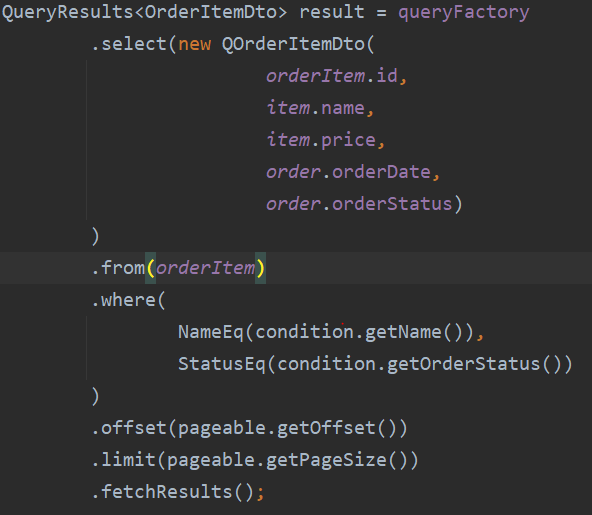
조인이 없었다.
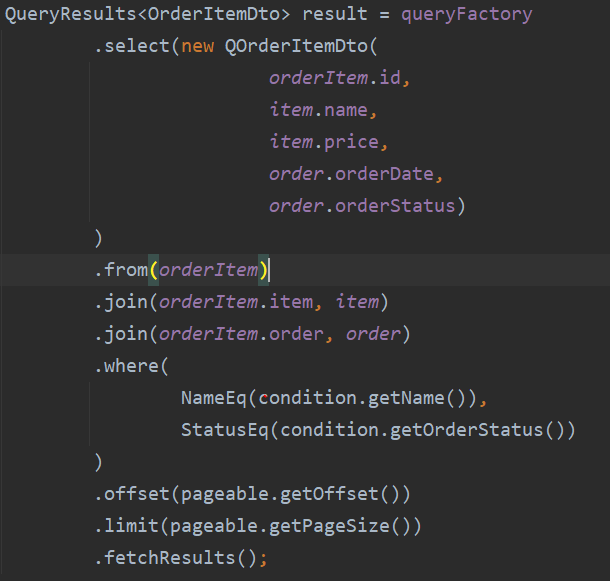
다시는 같은 실수를 하지 않으려고 글로 남긴다.
타임리프 여러개의 PathVariable 넘기기
증상

이렇게 넣으면 될 줄 알았는데, `PathVariable`이 제대로 넘어가지 않았다.

해결
타임리프 문서(https://www.thymeleaf.org/doc/articles/standardurlsyntax.html)를 확인해 봤다.

괄호를 두 개로 나누는 게 아니라 콤마로 연결하는 것이었다.
교훈
문서를 잘 확인하자.
스프링 메시지 / 국제화 인코딩
Expecting:
<"??">
to be equal to:
<"안녕">
but was not.
org.opentest4j.AssertionFailedError:
Expecting:
<"??">
to be equal to:
<"안녕">
but was not.
at java.base/jdk.internal.reflect.NativeConstructorAccessorImpl.newInstance0(Native Method)
at java.base/jdk.internal.reflect.NativeConstructorAccessorImpl.newInstance(NativeConstructorAccessorImpl.java:62)
at java.base/jdk.internal.reflect.DelegatingConstructorAccessorImpl.newInstance(DelegatingConstructorAccessorImpl.java:45)
at hello.itemservice.message.MessageSourceTest.helloMessage(MessageSourceTest.java:19)
at java.base/jdk.internal.reflect.NativeMethodAccessorImpl.invoke0(Native Method)
at java.base/jdk.internal.reflect.NativeMethodAccessorImpl.invoke(NativeMethodAccessorImpl.java:62)
at java.base/jdk.internal.reflect.DelegatingMethodAccessorImpl.invoke(DelegatingMethodAccessorImpl.java:43)
at java.base/java.lang.reflect.Method.invoke(Method.java:566)
at org.junit.platform.commons.util.ReflectionUtils.invokeMethod(ReflectionUtils.java:688)
at org.junit.jupiter.engine.execution.MethodInvocation.proceed(MethodInvocation.java:60)
at org.junit.jupiter.engine.execution.InvocationInterceptorChain$ValidatingInvocation.proceed(InvocationInterceptorChain.java:131)
at org.junit.jupiter.engine.extension.TimeoutExtension.intercept(TimeoutExtension.java:149)
at org.junit.jupiter.engine.extension.TimeoutExtension.interceptTestableMethod(TimeoutExtension.java:140)
at org.junit.jupiter.engine.extension.TimeoutExtension.interceptTestMethod(TimeoutExtension.java:84)
at org.junit.jupiter.engine.execution.ExecutableInvoker$ReflectiveInterceptorCall.lambda$ofVoidMethod$0(ExecutableInvoker.java:115)
at org.junit.jupiter.engine.execution.ExecutableInvoker.lambda$invoke$0(ExecutableInvoker.java:105)
at org.junit.jupiter.engine.execution.InvocationInterceptorChain$InterceptedInvocation.proceed(InvocationInterceptorChain.java:106)
at org.junit.jupiter.engine.execution.InvocationInterceptorChain.proceed(InvocationInterceptorChain.java:64)
at org.junit.jupiter.engine.execution.InvocationInterceptorChain.chainAndInvoke(InvocationInterceptorChain.java:45)
at org.junit.jupiter.engine.execution.InvocationInterceptorChain.invoke(InvocationInterceptorChain.java:37)
at org.junit.jupiter.engine.execution.ExecutableInvoker.invoke(ExecutableInvoker.java:104)
at org.junit.jupiter.engine.execution.ExecutableInvoker.invoke(ExecutableInvoker.java:98)
at org.junit.jupiter.engine.descriptor.TestMethodTestDescriptor.lambda$invokeTestMethod$6(TestMethodTestDescriptor.java:210)
at org.junit.platform.engine.support.hierarchical.ThrowableCollector.execute(ThrowableCollector.java:73)
at org.junit.jupiter.engine.descriptor.TestMethodTestDescriptor.invokeTestMethod(TestMethodTestDescriptor.java:206)
at org.junit.jupiter.engine.descriptor.TestMethodTestDescriptor.execute(TestMethodTestDescriptor.java:131)
at org.junit.jupiter.engine.descriptor.TestMethodTestDescriptor.execute(TestMethodTestDescriptor.java:65)
at org.junit.platform.engine.support.hierarchical.NodeTestTask.lambda$executeRecursively$5(NodeTestTask.java:139)
at org.junit.platform.engine.support.hierarchical.ThrowableCollector.execute(ThrowableCollector.java:73)
at org.junit.platform.engine.support.hierarchical.NodeTestTask.lambda$executeRecursively$7(NodeTestTask.java:129)
at org.junit.platform.engine.support.hierarchical.Node.around(Node.java:137)
at org.junit.platform.engine.support.hierarchical.NodeTestTask.lambda$executeRecursively$8(NodeTestTask.java:127)
at org.junit.platform.engine.support.hierarchical.ThrowableCollector.execute(ThrowableCollector.java:73)
at org.junit.platform.engine.support.hierarchical.NodeTestTask.executeRecursively(NodeTestTask.java:126)
at org.junit.platform.engine.support.hierarchical.NodeTestTask.execute(NodeTestTask.java:84)
at java.base/java.util.ArrayList.forEach(ArrayList.java:1541)
at org.junit.platform.engine.support.hierarchical.SameThreadHierarchicalTestExecutorService.invokeAll(SameThreadHierarchicalTestExecutorService.java:38)
at org.junit.platform.engine.support.hierarchical.NodeTestTask.lambda$executeRecursively$5(NodeTestTask.java:143)
at org.junit.platform.engine.support.hierarchical.ThrowableCollector.execute(ThrowableCollector.java:73)
at org.junit.platform.engine.support.hierarchical.NodeTestTask.lambda$executeRecursively$7(NodeTestTask.java:129)
at org.junit.platform.engine.support.hierarchical.Node.around(Node.java:137)
at org.junit.platform.engine.support.hierarchical.NodeTestTask.lambda$executeRecursively$8(NodeTestTask.java:127)
at org.junit.platform.engine.support.hierarchical.ThrowableCollector.execute(ThrowableCollector.java:73)
at org.junit.platform.engine.support.hierarchical.NodeTestTask.executeRecursively(NodeTestTask.java:126)
at org.junit.platform.engine.support.hierarchical.NodeTestTask.execute(NodeTestTask.java:84)
at java.base/java.util.ArrayList.forEach(ArrayList.java:1541)
at org.junit.platform.engine.support.hierarchical.SameThreadHierarchicalTestExecutorService.invokeAll(SameThreadHierarchicalTestExecutorService.java:38)
at org.junit.platform.engine.support.hierarchical.NodeTestTask.lambda$executeRecursively$5(NodeTestTask.java:143)
at org.junit.platform.engine.support.hierarchical.ThrowableCollector.execute(ThrowableCollector.java:73)
at org.junit.platform.engine.support.hierarchical.NodeTestTask.lambda$executeRecursively$7(NodeTestTask.java:129)
at org.junit.platform.engine.support.hierarchical.Node.around(Node.java:137)
at org.junit.platform.engine.support.hierarchical.NodeTestTask.lambda$executeRecursively$8(NodeTestTask.java:127)
at org.junit.platform.engine.support.hierarchical.ThrowableCollector.execute(ThrowableCollector.java:73)
at org.junit.platform.engine.support.hierarchical.NodeTestTask.executeRecursively(NodeTestTask.java:126)
at org.junit.platform.engine.support.hierarchical.NodeTestTask.execute(NodeTestTask.java:84)
at org.junit.platform.engine.support.hierarchical.SameThreadHierarchicalTestExecutorService.submit(SameThreadHierarchicalTestExecutorService.java:32)
at org.junit.platform.engine.support.hierarchical.HierarchicalTestExecutor.execute(HierarchicalTestExecutor.java:57)
at org.junit.platform.engine.support.hierarchical.HierarchicalTestEngine.execute(HierarchicalTestEngine.java:51)
at org.junit.platform.launcher.core.EngineExecutionOrchestrator.execute(EngineExecutionOrchestrator.java:108)
at org.junit.platform.launcher.core.EngineExecutionOrchestrator.execute(EngineExecutionOrchestrator.java:88)
at org.junit.platform.launcher.core.EngineExecutionOrchestrator.lambda$execute$0(EngineExecutionOrchestrator.java:54)
at org.junit.platform.launcher.core.EngineExecutionOrchestrator.withInterceptedStreams(EngineExecutionOrchestrator.java:67)
at org.junit.platform.launcher.core.EngineExecutionOrchestrator.execute(EngineExecutionOrchestrator.java:52)
at org.junit.platform.launcher.core.DefaultLauncher.execute(DefaultLauncher.java:96)
at org.junit.platform.launcher.core.DefaultLauncher.execute(DefaultLauncher.java:75)
at org.gradle.api.internal.tasks.testing.junitplatform.JUnitPlatformTestClassProcessor$CollectAllTestClassesExecutor.processAllTestClasses(JUnitPlatformTestClassProcessor.java:99)
at org.gradle.api.internal.tasks.testing.junitplatform.JUnitPlatformTestClassProcessor$CollectAllTestClassesExecutor.access$000(JUnitPlatformTestClassProcessor.java:79)
at org.gradle.api.internal.tasks.testing.junitplatform.JUnitPlatformTestClassProcessor.stop(JUnitPlatformTestClassProcessor.java:75)
at org.gradle.api.internal.tasks.testing.SuiteTestClassProcessor.stop(SuiteTestClassProcessor.java:61)
at java.base/jdk.internal.reflect.NativeMethodAccessorImpl.invoke0(Native Method)
at java.base/jdk.internal.reflect.NativeMethodAccessorImpl.invoke(NativeMethodAccessorImpl.java:62)
at java.base/jdk.internal.reflect.DelegatingMethodAccessorImpl.invoke(DelegatingMethodAccessorImpl.java:43)
at java.base/java.lang.reflect.Method.invoke(Method.java:566)
at org.gradle.internal.dispatch.ReflectionDispatch.dispatch(ReflectionDispatch.java:36)
at org.gradle.internal.dispatch.ReflectionDispatch.dispatch(ReflectionDispatch.java:24)
at org.gradle.internal.dispatch.ContextClassLoaderDispatch.dispatch(ContextClassLoaderDispatch.java:33)
at org.gradle.internal.dispatch.ProxyDispatchAdapter$DispatchingInvocationHandler.invoke(ProxyDispatchAdapter.java:94)
at com.sun.proxy.$Proxy2.stop(Unknown Source)
at org.gradle.api.internal.tasks.testing.worker.TestWorker.stop(TestWorker.java:133)
at java.base/jdk.internal.reflect.NativeMethodAccessorImpl.invoke0(Native Method)
at java.base/jdk.internal.reflect.NativeMethodAccessorImpl.invoke(NativeMethodAccessorImpl.java:62)
at java.base/jdk.internal.reflect.DelegatingMethodAccessorImpl.invoke(DelegatingMethodAccessorImpl.java:43)
at java.base/java.lang.reflect.Method.invoke(Method.java:566)
at org.gradle.internal.dispatch.ReflectionDispatch.dispatch(ReflectionDispatch.java:36)
at org.gradle.internal.dispatch.ReflectionDispatch.dispatch(ReflectionDispatch.java:24)
at org.gradle.internal.remote.internal.hub.MessageHubBackedObjectConnection$DispatchWrapper.dispatch(MessageHubBackedObjectConnection.java:182)
at org.gradle.internal.remote.internal.hub.MessageHubBackedObjectConnection$DispatchWrapper.dispatch(MessageHubBackedObjectConnection.java:164)
at org.gradle.internal.remote.internal.hub.MessageHub$Handler.run(MessageHub.java:414)
at org.gradle.internal.concurrent.ExecutorPolicy$CatchAndRecordFailures.onExecute(ExecutorPolicy.java:64)
at org.gradle.internal.concurrent.ManagedExecutorImpl$1.run(ManagedExecutorImpl.java:48)
at java.base/java.util.concurrent.ThreadPoolExecutor.runWorker(ThreadPoolExecutor.java:1128)
at java.base/java.util.concurrent.ThreadPoolExecutor$Worker.run(ThreadPoolExecutor.java:628)
at org.gradle.internal.concurrent.ThreadFactoryImpl$ManagedThreadRunnable.run(ThreadFactoryImpl.java:56)
at java.base/java.lang.Thread.run(Thread.java:834)
2021-08-07 10:51:06.397 INFO 12216 --- [extShutdownHook] o.s.s.concurrent.ThreadPoolTaskExecutor : Shutting down ExecutorService 'applicationTaskExecutor'
MessageSourceTest > helloMessage() FAILED
org.opentest4j.AssertionFailedError at MessageSourceTest.java:19
1 test completed, 1 failed
> Task :test FAILED
FAILURE: Build failed with an exception.
* What went wrong:
Execution failed for task ':test'.
> There were failing tests. See the report at: file:///C:/Users/dpffp/Desktop/STUDY/message/build/reports/tests/test/index.html
* Try:
Run with --stacktrace option to get the stack trace. Run with --info or --debug option to get more log output. Run with --scan to get full insights.
* Get more help at https://help.gradle.org
BUILD FAILED in 19s
4 actionable tasks: 1 executed, 3 up-to-date
원인
테스트를 돌리던 중에 이 오류가 났다. 인코딩 문제로 보여 인코딩 설정을 손봤더니 해결됐다.
해결
File → Settings → Editor → File Encoding으로 가서 Global Encoding, Project Encoding, Default encoding for properties files를 모두 UTF-8로 지정한다.
그러면 `messages.properties`의 한글이 전부 `??`로 바뀌어 있을 것이다. 이것들을 다시 제대로 입력해 주면 끝난다.
javax.mail.AuthenticationFailedException: 535-5.7.8 Username and Password not accepted. Learn more at
증상
구글 SMTP를 쓰던 중에 인증 실패 오류가 났다.
첫 번째 방법 — 보안 수준이 낮은 앱 허용
검색해 보니 계정에서 보안 수준이 낮은 앱의 액세스가 허용되지 않아 메일 전송이 실패한 것이었다. 계정 설정에서 해당 탭으로 가 허용해 주면 해결된다.

다만 보안이 취약해질 수 있다는 안내가 걸려서, 다른 방법을 찾아보기로 했다.
두 번째 방법 — 앱 비밀번호
로그에 찍힌 주소(https://support.google.com/mail/?p=BadCredentials)로 들어가면 안내가 나온다.

2단계 인증이 걸린 계정의 SMTP는 앱 비밀번호를 쓰면 된다.

2단계 인증을 켠 뒤 앱 비밀번호를 발급받고, `application.yml`의 `spring.mail.password`에 계정 비밀번호가 아니라 앱 비밀번호를 적어 주면 해결된다.
Cafe24 배포 중 OutOfMemoryError : Metaspace
증상
프로젝트를 끝내고 배포만 하면 되는 상황이었는데, 배포에서 `OutOfMemoryError`를 만났다.
org.springframework.beans.factory.UnsatisfiedDependencyException:
Error creating bean with name 'homeController' defined in file
[/ks3254/tomcat/webapps/ROOT/WEBINF/classes/com/foryou/onlyonepagewithyou/controller/HomeController.class]:
Unsatisfied dependency expressed through constructor parameter 0; nested exception is
org.springframework.beans.factory.BeanCreationException: Error creating bean with name
'carouselRepository' defined in com.foryou.onlyonepagewithyou.repository.CarouselRepository
defined in @EnableJpaRepositories declared on JpaRepositoriesRegistrar.EnableJpaRepositoriesConfiguration:
Invocation of init method failed; nested exception is java.lang.OutOfMemoryError: Metaspace
Metaspace가 뭔가
검색해 보니 JVM 메모리가 부족할 때 생기는 현상이라고 한다. 그리고 `OutOfMemoryError`에도 여러 종류가 있다는 걸 이때 알았다. 이 글은 그중 Metaspace를 다룬다.
Metaspace는 쉽게 말해 JVM의 클래스 로더가 클래스를 메타데이터로 만들어 저장해 두는 공간이다.
그런데 나는 Metaspace가 넘칠 만큼 클래스가 많다고 생각하지 않았다. 자바 클래스 48개에 라이브러리로 딸려온 jar가 25개뿐인 작은 프로젝트였기 때문이다. 심지어 이보다 큰 프로젝트도 cafe24에 배포해서 잘 쓰고 있었다.
삽질 기록
에러 로그를 한 줄씩 검색해 가며 온갖 것을 다 시도했다.
첫 줄의 `Error creating bean with name ...` → 빈이 생성되지 않는 이유를 찾아봤다.
조금 아래의 `Unsatisfied dependency expressed through constructor parameter` → 순환 참조일 때 뜨는 에러라고 한다. 하지만 나는 순환 참조를 쓰지 않았다.
`@EnableJpaRepositories` → JPA를 쓰면 `JpaRepository`를 상속한 인터페이스에 `@Repository`가 자동으로 붙는다는 것도 이때 알았다.
그러다 같은 문제를 겪고 해결한 사람의 글(https://honeyinfo7.tistory.com/173)을 찾았다.
catalina.sh 열기 (cafe24 배포 기준)
먼저 `catalina.sh`를 열어야 했다. 톰캣 재시작만 해본 나에게 리눅스는 큰 벽이었지만, 검색해 가며 알아냈다.
1. putty를 켜고 계정에 접속한다.
2. `cd tomcat`
3. `cd bin`
4. `vi catalina.sh`
어디에 적어야 할지 고민할 수 있는데, 맨 위 `#!/bin/sh` 바로 아래에 적으면 된다.
vi 간단 조작법
입력 모드 : `i` (관전 모드일 때만 들어간다)
관전 모드 : `ESC` (방향키로 이동할 수 있다)
한 글자 지우기 : `x` (관전 모드에서만)
저장 후 종료 : `ZZ` (관전 모드에서 Shift+zz)
해결
그 글대로 따라 했더니 이번에는 실행 자체가 안 됐다. JVM을 생성할 수 없다는 에러였다.
멘탈이 나가기 직전에 OKKY와 네이버 지식인에 글을 올렸다. 지식인에서 메타스페이스 설정을 바꾸라는 답을 받았고, JVM 메모리가 64MB로 정해져 있어도 메타스페이스를 바꿀 수 있느냐는 추가 질문에도 가능하다는 답이 돌아왔다.
다시 검색해 답을 찾았다. `JAVA_OPTS`에 이 두 개를 추가하면 된다.
`-XX:MetaspaceSize=1024m` — 메타스페이스를 1GB로 설정
`-XX:MaxMetaspaceSize=1024m` — 메타스페이스 최대 크기를 1GB로 설정
`catalina.sh`를 열어 기본값과 함께 적어 넣었다. 최종 설정은 이렇다.
JAVA_OPTS="-Djava.awt.headless=true -Dfile.encoding=UTF-8 -server -XX:MetaspaceSize=1024m -XX:MaxMetaspaceSize=1024m"
이대로 저장하고 톰캣을 재시작하니 거짓말처럼 스프링이 정상 작동했다.
남는 것
거의 하루를 꼬박 갈아 넣어 얻은 지식이라 그만큼 뿌듯하다. 얼마 전 면접 준비로 JVM을 공부한 적이 있는데, 검색하다 아는 내용이 나와서 내심 반가웠다.
다만 이 방법은 cafe24에 한정이고, EC2 환경에서는 어떻게 해결하는지 아직 모른다. 나처럼 열두 시간씩 갈아 넣지 말고 한 번에 해결하는 데 도움이 되길 바란다.
스프링부트 ec2 배포 중 fatal : not a git repository (or any of the parent directories) : .git
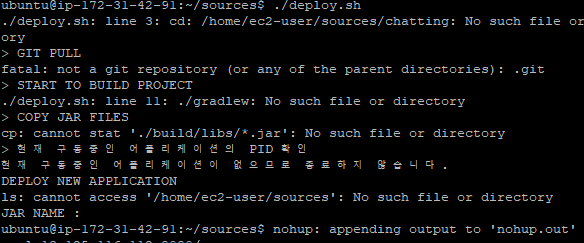
원인
`git remote origin`으로 연결을 해 두지 않아서 생긴 문제다.
해결
`git remote add origin 리포지토리주소`로 해결된다.
스프링 부트 ec2 배포중 gradlew 빌드 후 Execution failed for task ':test' 에러
증상
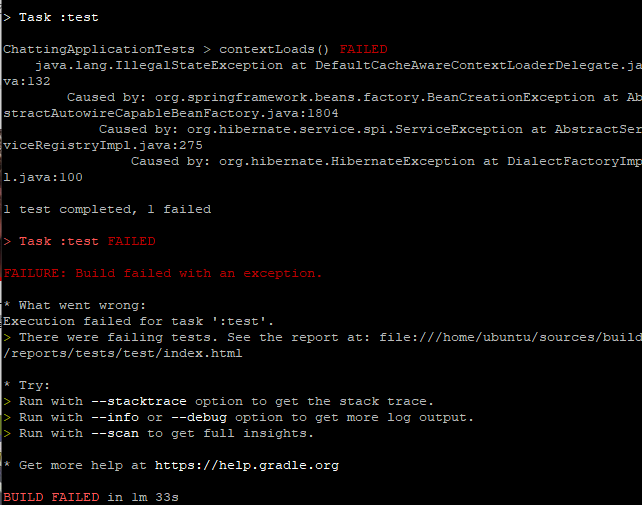
몇 시간 동안 별걸 다 해봤다.
1. gradle 버전을 바꾸면 된다고 해서 wrapper 폴더의 `gradle.properties`에서 4.10.2로 변경
2. swap 메모리를 4GB로 늘리기
3. gradle을 설치하고 `gradle --debug build` 후 재시작
해결
여기까지 하고도 안 된 사람을 위해 남긴다. stack overflow에서 방법을 찾았다.
`build.gradle`에
tasks.withType(Test) {
scanForTestClasses = false
include "**/*Test.class"
}
를 추가하니 정상적으로 빌드됐다.
스프링부트 ec2 배포 중 ./gradlew: Permission denied
원인
`gradlew`에 실행 권한이 없어서 생기는 문제다. 여기까지는 검색하면 지겹도록 나온다.
그런데 안 통했다
문제는 검색해서 나오는
chmod 755 gradlew
chmod +x gradlew
이런 방법들이 하나도 안 통했다는 것이다.
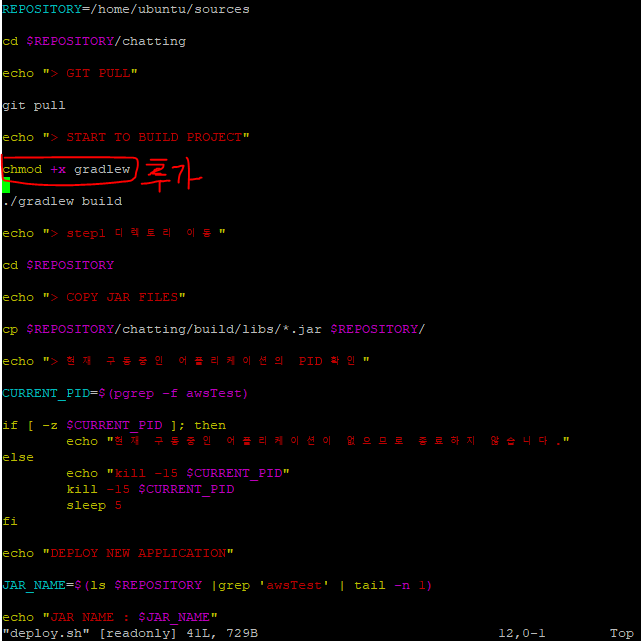
해결
그래서 `deploy.sh` 파일을 열어 gradlew로 빌드하기 직전에 `chmod +x gradlew`를 넣었더니 해결됐다.